Dante OS
The two modes: full or launcher only
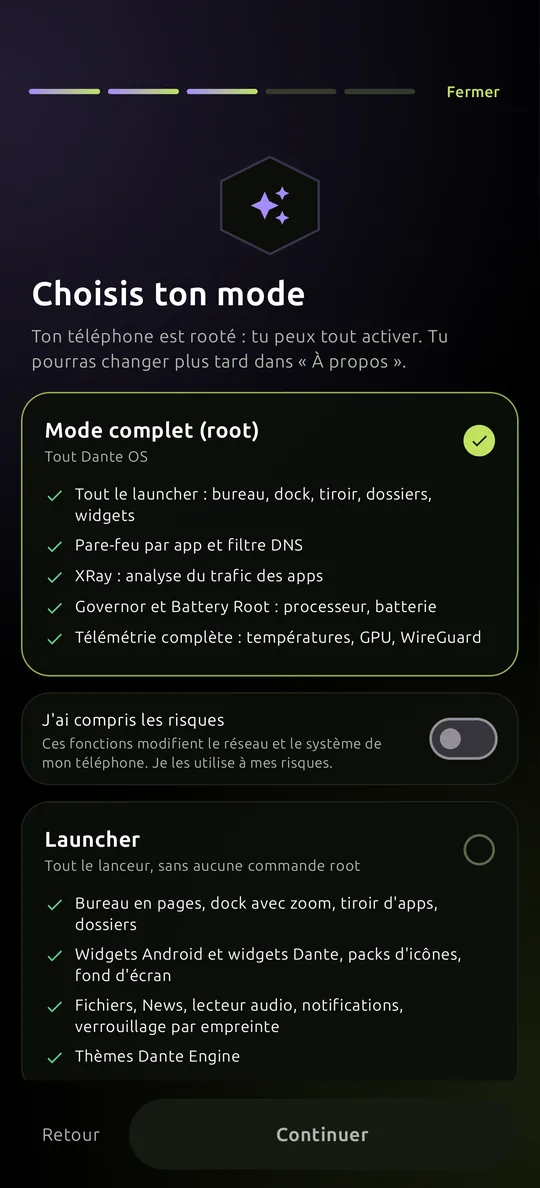
With or without root. You choose, and you can change your mind at any time.
Full mode (root): all of Dante OS. It needs a rooted phone (Magisk, Kitsune Mask or KernelSU). Dante can then set network rules, tune the processor and battery, read the sensors. A risk warning must be accepted.
Launcher only (no root): no root command is ever run. You keep the desktop, the dock with zoom, the drawer, folders, Android widgets, icon packs, wallpaper, and the modules that do not need root: Files, SSH, News, Sonic, Notifications, Private Node, JSON tools, fingerprint Lock, Guide.
In launcher-only mode, these modules are hidden: Firewall, DNS Filter, XRay, Governor and Battery Root. Telemetry is limited to battery, memory and network.
Step by step
- To change: open About → Operating mode.
- To redo the initial diagnostic: About → Review the welcome.
Tips
Switching to launcher only first cleanly removes the firewall and DNS rules that Dante had set.
At first launch, the phone diagnostic makes your root manager's window appear. You can refuse: Dante will then run in launcher-only mode.