Dante OS
Icons and icon packs
Size, number per row, names, shape and icon pack.
The Icons tile sets the desktop icons: size (70 to 130%), number per row (4 to 6: the more there are, the smaller they get), a dark card behind or bare icons, and the names under each icon.
"Icon pack": "Original icons" or one of the icon packs installed on the phone (the ones you download like any app). The choice applies to all your apps, on the desktop and in the dock.
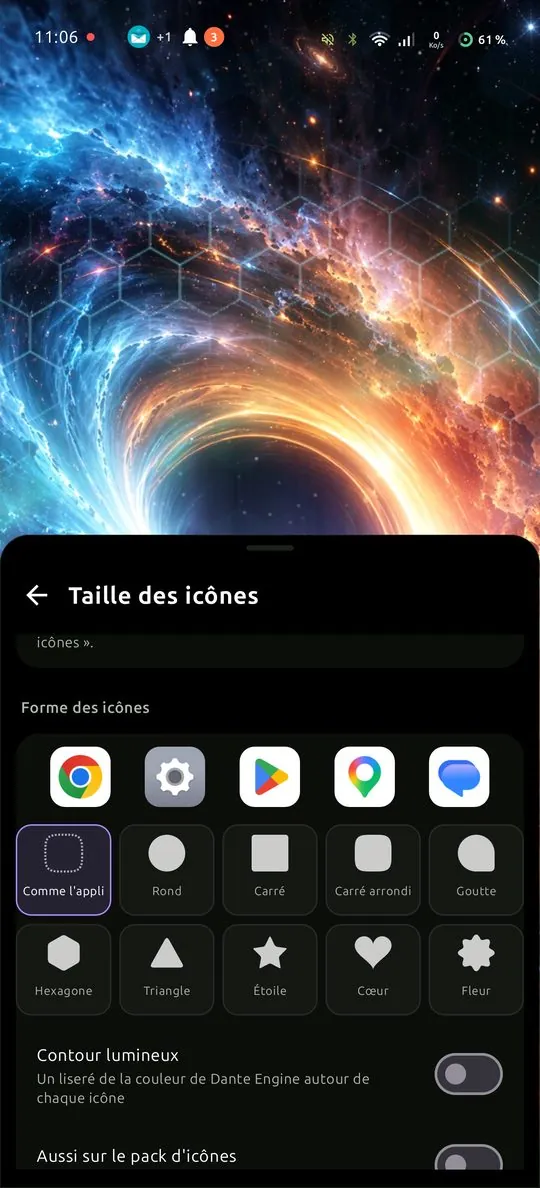
"Icon shape": as the app (the phone's own), circle, square, rounded square, teardrop, hexagon, triangle, star, heart or flower, with a preview on your real apps. The app's drawing is cut cleanly into the shape; old single-image icons sit on a plate of their own colour. Everywhere: desktop, dock, Hive, drawer and folders.
"Glowing outline" adds a rim in the Dante Engine colour. With an icon pack, its icons keep their style unless you turn on "Also on the icon pack".
One app in another shape (your favourite app as a star, for example): hold its icon on the desktop, release without moving, "Icon shape". "Like the others" puts it back.
Dante OS modules have their own drawn icons; you can also give them an icon from a pack or an image of yours, module by module.