Dante OS
Dex Lab
Analyze an application's code to see what it can do.
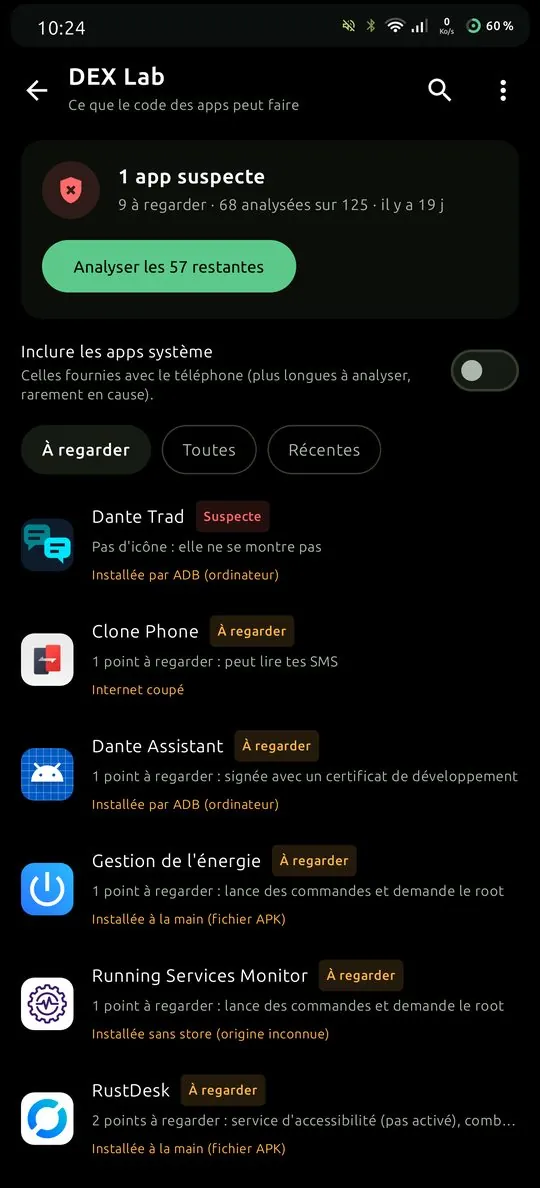
An Android app's code is stored in "DEX" files. Dante OS reads them, without running anything, and lists exactly which Android functions the app calls: sending an SMS, reading the screen, loading code from elsewhere…
It cross-checks this code with the permissions requested, the declared services (accessibility, notifications, administrator…), what is enabled right now, where the app comes from (store or APK file), its signature, and the web addresses written in its code (compared with your DNS filter lists).
Verdicts: "Nothing worrying" (nothing out of the ordinary), "Worth a look" (a sensitive power, often justified: a keyboard sees what you type, that is normal), "Suspicious" (a combination typical of malware, for example hidden code + installed outside a store, or accessibility + SMS reading on an app with no icon).
Step by step
- To analyze a file before installing it: ⋮ menu → "Analyze an APK file". The file is analyzed without being installed.
- Facing a suspicious app: look at where it comes from. If you do not recognize it, "Cut Internet" (firewall) stops it from sending anything, then "Uninstall". If it is a device administrator, remove that status in the security settings first.
Tips
"Suspicious" does not mean "surely malicious": read the possible honest reasons.
Conversely, an app can download code later or encrypt its own (packer): Dante OS flags it, but cannot read what is not there.