Dante OS
Firewall
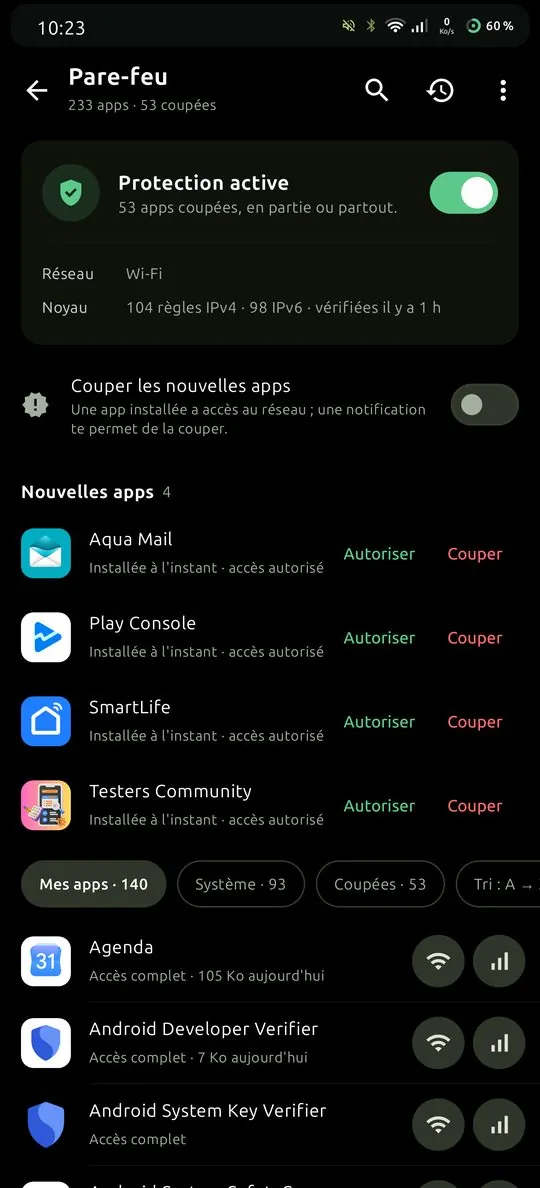
Allow or block Internet for each app, depending on the network type.
For each installed application, you choose whether it may use Wi-Fi, mobile data, roaming, the local network and tethering. A game that does not need Internet can be cut off completely; an app that should only talk on Wi-Fi can be cut on mobile data.
Dante sets its rules in the Android kernel with iptables and ip6tables (IPv4 and IPv6), in a chain of its own named DANTE_FW. There is no VPN: your real VPN stays free.
A log keeps track of each rule application, and an alert warns you when a new app is installed.
Step by step
- Open Firewall and turn it on with the main switch.
- Tap an app to set its network rights by connection type.
- Check the log to make sure the rules were applied.
Tips
iptables rules disappear by themselves when the phone reboots; Dante reapplies them at startup only if the firewall was enabled.
Blocking an essential system app can break phone functions. If in doubt, put the app back to "allowed".
To remove everything at once: About → Root features → turn off. The rules are cleanly removed before the cut.